

Browser KidZui Version 4 Released


Cnet.com site launch which is a browser extension in Firefox has a better speed when compared with the previous version. Kidzui 4 also specifically claimed best for netbook users.
Kidzui is such that browser that can protect children from violence cybercrime. For those of you who want to try, please download the application directly in the link KiDZui 4 or Kidzui.com
Acer Launches the AspireRevo: The First NVIDIA Ion Nettop
 Word of Nvidia Ion-based computers’ power and diminutive size spread far and wide last week, with projected release dates as early as “this spring.” Since my hay fever is acting up and the snow is melting, that could have meant “any day now,” and it appears it did.
Acer recently announced the AspireRevo, a name that just rolls off the tongue, and performance purported to equal that of much more well-endowed desktop PCs.
While the specs resemble those of a netbook, the ION GPU makes the 7.1 x 7.1 x 1.2-inch AspireRevo capable of hi-def output, and powering the likes of Call of Duty 4, Spore and DirectX 10 games.
- 1.6GHz Intel Atom 230 CPU
- Up to 4GB of RAM
- Up to 250GB of hard drive space
- 6 USB ports
- Audio in/out
- HDMI/VGA outputs
- Gigabit Ethernet
- 4-in-1 memory card reader
No official word on the release date of the AspireRevo, but rumor is it will be available sometime in Q2 this year. I can’t wait to see how these nettops stack up to full desktops. If they are comparable in performance, it will change the way we personally compute for the foreseeable future.
Gmail’s Mobile Web App: Floaty Bars, Spinners and Gears
 The Google gurus have released a major revision to their mobile web app for Android phones and iPhone/iPod touches running OS 2.2.1. This newest incarnation sports an improved interface, more consistent performance, faster message access and it supports robust batch actions like archiving multiple messages.
Using Google’s Gears, email is cached on the device and then actions (like starring, deleting or archiving) are applied to the cached version of the message immediately but sent to Gmail’s servers in the background whenever there is a network connection available. So, if you’re dealing with a slow connection speed you can still access recently read messages or compose mail.
One of the most obvious improvements is the “floaty bar” (Google-speak) which is essentially an animated smart dropdown menu that keeps up with you as you scroll allowing you to mark, read and star email no matter how long the list.
To make mobile life even simpler, Google has provided a nifty method to create a button on your device’s home screen so your Gmail account is easily accessible without having to fire up an Internet browser first.Sony-Ericsson-Idou

Internet Download Manager 5.16 Build 3 Final
 Internet Download Manager again to update the new version: 5:16 IDM Build 3. IDM is very quick to update its version, released after the previous IDM IDM 5:16 and 5:16 Build 2. 5:16 IDM Build 3 released to improve the integration of the IDM download firefox and fix a bug related to download a text file. Internet Download Manager is a very appropriate choice as the Download Manager and Download Accelerator, because it can increase download speed.
If we are for this as the IDM Download Manager, then it seems we need to do the update. To not have that IDM can use this software as a download manager. Because it can increase the download speed when you download a file on the internet
Internet Download Manager 5.16 has a smart download logic accelerator that features intelligent dynamic file segmentation and safe multipart downloading technology to accelerate your downloads. Unlike other download accelerators and managers that segment files before downloading starts, Internet Download Manager segments downloaded files dynamically during download process. Internet Download Manager reuses available connections without additional connect and login stages to achieve better acceleration performance.
Internet Download Manager supports proxy servers, ftp and http protocols, firewalls, redirects, cookies, authorization, MP3 audio and MPEG video content processing. IDM integrates seamlessly into Microsoft Internet Explorer, Netscape, MSN Explorer, AOL, Opera, Mozilla, Mozilla Firefox, Mozilla Firebird, Avant Browser, MyIE2, and all other popular browsers to automatically handle your downloads. You can also drag and drop files, or use Internet Download Manager from command line. Internet Download Manager can dial your modem at the set time, download the files you want, then hang up or even shut down your computer when it’s done.

Some Featured is added to the IDM version 5.16 :
- Completely remade the logic of download resume feature and added the possibility to resume downloads for sites that use temporary download addresses or when download addresses expire
- Added the possibility to select a queue when you press on OK button on “Download all links with IDM” dialog and when you press on “Download Later” button on “Download file info” (start download) dialog
- Added a link to the page where download was taken over from a browser to “File Properties” dialog
- Made many other small improvements and fixed all known bugs
What’s new in version 5.16 build 2 :
- Resolved Firefox integration problems
- Fixed bugs related to downloading of text files
- Download and extract IDM v 5:16
- Make the process of installation on the file idman516f.exe
- If you have previously installed an older version of IDM can overwrite and continue the installation files with the new installer IDM
- After the installation is complete, use the file in the folder there is a patch that 5.xxx be 5:16 IDM Full Version
- Then run the file 5.xx Patch (2008-12-06). Exe
- Finished
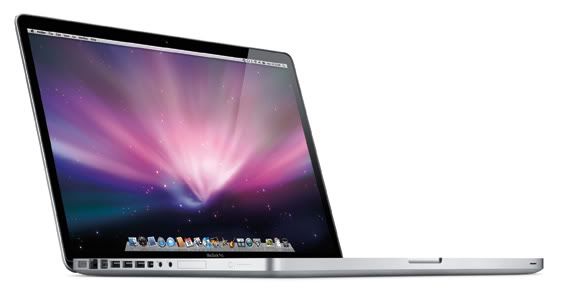
Apple Macbook Pro 17 inch

Apple polishes up and redesigns its largest laptop.
The new 17-inch Apple MacBook Pro arrived a little late to the unibody makeover party at Apple: Most of the company's laptop line switched to a thinner, lighter, aluminum design in October 2008. But the new version's metallic exterior isn't the only change. Incremental updates boost processor, system bus, and RAM speeds; but the biggest improvement is in battery design. Apple says that the new laptop's battery is 40 percent larger than the battery in its 17-inch predecessor, and enables the new laptop to run for up to 8 hours on a single charge.
The new 17-inch Apple MacBook Pro arrived a little late to the unibody makeover party at Apple: Most of the company's laptop line switched to a thinner, lighter, aluminum design in October 2008. But the new version's metallic exterior isn't the only change. Incremental updates boost processor, system bus, and RAM speeds; but the biggest improvement is in battery design. Apple says that the new laptop's battery is 40 percent larger than the battery in its 17-inch predecessor, and enables the new laptop to run for up to 8 hours on a single charge.
This MacBook Pro comes with the same 5400-rpm, 320GB hard-disk drive as the previous one, though you can customize it with a faster (7200-rpm) 320GB HDD for $50, or opt for either a 128GB ($300) or a 256GB ($750) solid-state drive. The new laptop comes standard with 4GB of RAM, as did its predecessor (you can upgrade to 8GB of RAM for $1000 more), but the memory is now DDR3 at 1066MHz instead of DDR2 at 667MHz. The system's Intel Core 2 Duo processor steps up from 2.5GHz in the previous generation to 2.66GHz, though with the same 6MB of L2 cache; for an additional $300, you can upgrade to a speedier 2.93GHz processor. The new 17-inch MacBook Pro has a 1066MHz front side bus, too, versus its predecessor's 800MHz front side bus.
Like Apple's other unibody laptops, the 17-inch MacBook Pro's wide-screen display uses mercury-free LED backlighting and arsenic-free glass. The screen has a native resolution of 1920 by 1200 pixels. The glossy screen shows bright, vibrant colors and deep, rich blacks. For people who dislike highly reflective glossy screens because of glare, Apple offers an antiglare option for $50 extra. The new model moves the optical drive slot from the right front of the case to the right side. All of the ports now reside on the left side.
For connecting an external display, the new Mini DisplayPort supplants the full-size DVI port of previous-generation models. Apple is currently the only company using Mini DisplayPort, and the only Mini DisplayPort LCD it sells is the 24-inch Apple LED Cinema Display. Apple chose not to include a Mini DisplayPort-to-DVI adapter for connecting the new laptop to a DVI connector; it offers the adapter separately for $29.
Like the most recent version of the 15-inch MacBook Pro, the new 17-inch MacBook Pro has a dual graphics subsystem--a high-performance nVidia GeForce 9600M GT chip with 512MB of dedicated GDDR3 memory, and a lower-performing, battery-saving nVidia GeForce 9400M that shares 256MB of RAM with the main processor. The earlier 17-inch MacBook Pro had a single graphics engine, the nVidia GeForce 8600M GT, with its own 512MB of GDDR3 memory. Tests of the laptop running Mac OS X by the Macworld Test Center indicate that the 9600M GT graphics offers a significant performance boost over the 9400M. We're still awaiting WorldBench 6 results for the new MacBook Pro running Windows Vista in Boot Camp.
The new battery on the latest 17-inch MacBook Pro uses lithium polymer sheets instead of cylindrical lithium ion cells. It's now a fixed part--and no longer user-replaceable. According to Apple, the battery's new adaptive charging technology will permit the cell to be drained and recharged at least 1000 times while retaining at least 80 percent of its original capacity; that's between three and five times as many recharges as most laptop batteries can support. In the Macworld Test Center's battery life test--which involves looping a video in full-screen mode from a ripped DVD saved to the hard drive, with the display set to full brightness, and the Energy Saver preferences set never to sleep but to use the lower-powered nVidia GeForce 9400M graphics--the new 17-inch MacBook Pro ran for 4 hours, 43 minutes on a single charge, versus 3 hours, 36 minutes for its predecessor, and 2 hours, 46 minutes for the new 15-inch MacBook Pro. (In the PC World Test Center's battery life tests, that same 15-inch notebook survived for just 1 hour, 54 minutes.)
The new 17-inch MacBook Pro outperformed its predecessor by about 1.8 percent on the Macworld Test Center's system performance suite, Speedmark 5. On most tests, however--including Photohop, iMovie, and iTunes--both machines finished within a second or two of each other. For further details, consult Macworld's benchmark analysis of the 17-inch MacBook Pro.
The latest iteration of the 17-inch MacBook Pro laptop is clearly a winner, but we can't say precisely how much of a winner it is until we get all of our test results in from the PC World Test Center.


